
The team at Parking and Transportation Services is excited to welcome you to 2026 and back to campus!
We know the first few weeks of the academic year can be hectic as we all adjust to new schedules and new routines, so we want to provide some parking information to make navigating our roads, parking lots and garages a little easier.
Be sure to check out the new shuttle routes, effective January 12, 2026. Visit the Off-Campus Shuttles and On-Campus Shuttles pages for more information.
For updates regarding the B Lots and C-3 Lot renovation projects, please visit parking.ucf.edu.
Before you leave
- Check Garage Status online to see real-time availability.
- You can also see the garage status in the UCF Mobile App by tapping the “Parking” icon.
- Download and use Waze to navigate and avoid congested areas. Traffic congestion and garage closures will be updated in real-time.
- Arrive early to give yourself enough time to find a spot, especially during the first few weeks of the semester.
On campus
- Garages H, D and C are our most popular garages and tend to fill up by 9 a.m.
- For better availability during peak hours (9 a.m.–noon), try Garages A or I, which are a 5-minute walk from most academic buildings.
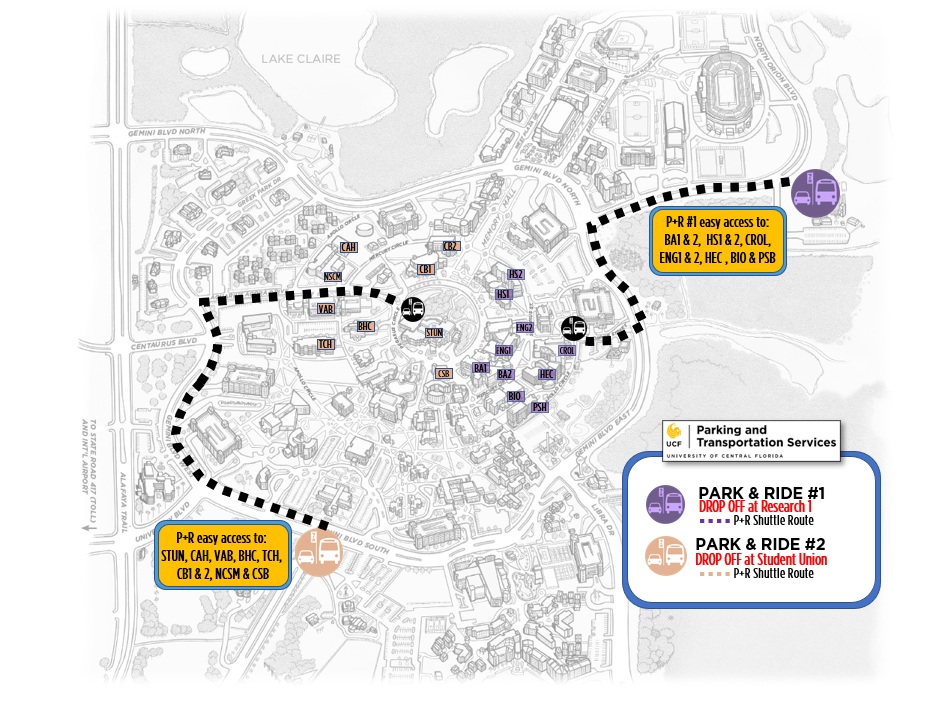
- Use our Park and Ride Shuttles for hassle-free parking during the first two weeks of the semester!
- Runs from 9 a.m. to 6 p.m. Jan. 12-15 and Jan. 20-23
- Drops off and picks up at:
- Lot B-6 (Visitor and Parking Information) and the Student Union Bus Loop.
- Lot E-4 (Softball lot) and the Research 1 bus loop.
- Digital Message Boards around campus show live parking availability. Keep an eye out for them as you travel around campus.
- Use this map to help plan your route onto campus.
Sign up for parking alerts
Download the UCF Mobile app and opt-in for parking alerts. Opt-in with four simple steps:
- Open the UCF Mobile App and tap the notifications icon
- Tap “Explore ALL CHANNELS”
- Look for “Parking Availability Updates”
- Tap the plus sign to opt-in.